
Common Mistakes Students Make When Filling Admission Forms
A strong test score can still be lost to a careless form. Name mismatches, wrong marks, locked preference lists, unreadable uploads and missed fee deadlines all cost students seats every year. Here are the most common mistakes and how to avoid each one.
By ParhaiKrlo Team · Published 3 Oct 2026 · 7 min read
Updated: 3 October 2026
You spend months preparing for an entry test, and then fill the admission form in twenty minutes at midnight before the deadline. That's how good students lose seats.
Universities are strict about forms. FAST's admission page says that if information on the form is incorrect, the university can "cancel the application/admission without any fee refund." UHS warns that a college you leave off your preference list "shall not be considered for grant of admission/up-gradation at any stage."
Here are the mistakes that cause the most trouble, and how to avoid each one.
Quick answer
- Match your name and details exactly to your CNIC or B-Form and board certificates.
- Enter marks exactly as they appear on your result card, and say if a result is awaited.
- Order your preferences carefully. On many portals they lock at the deadline.
- Upload clear, correct files in the size and format asked for.
- Pay every fee on time, and keep the receipt.
- Don't wait for the last day. Portals slow down, and banks close.
1. Name and details that don't match your documents
Your name, father's name and date of birth must match your CNIC or B-Form and your board certificates, spelling included. "Muhammad" and "Mohammad" can look the same to you, but a mismatch can cause questions at document checking, at the test centre or when you join.
Fix: Keep your CNIC or B-Form and your Matric certificate open as you type. Copy each detail exactly. If your documents disagree with each other, start getting them corrected now, because it takes time.
2. Wrong marks or the wrong total
Students often round their marks, type an old result, or enter marks out of the wrong total. Universities check every document at admission. FAST says "any incorrect/false information submitted by the applicant or any attempt to hide information will lead to disqualification."
Fix: Enter marks exactly as on your result card, with the correct total. If your Part II result isn't out yet, say so on the form, and enter your Part I marks if the form asks. Don't guess what you'll get.
3. Choosing the wrong category, stream or test option
Many forms ask you to choose a category or test option at the start:
- UHS asks you to choose your seat category: open merit, a quota such as disabled or under-developed district, or overseas.
- FAST asks you to select only one of three test options: its own test, SAT or NTS NAT. It also says an NTS test held for a specific university isn't accepted.
Fix: Read the eligibility rules for each category before you tick it. Pick the test option you're strongest in, and check that your score is the right kind of score.
4. Getting the preference order wrong
This is the costliest mistake, and it can't be fixed later.
In UHS's 2025-26 MBBS and BDS admissions, students could edit their form until the deadline, but after that "the number and order of preferences shall become final and immutable." For public colleges you had to select all colleges. For private colleges you could choose any number, but a college you left off was never offered.
Fix:
- Rank colleges by where you actually want to go, not by guessing where you'll get in. The system places you in the highest preference your merit allows.
- For private colleges, check the fee, location and facilities of each one before you list it, as UHS advises.
- If you'd genuinely be happy at a college, include it. Leaving it off can cost you a seat.
5. Bad or missing uploads
Blurry photos, wrong files, cut-off pages and oversized scans get applications rejected. UHS asked for files that are "clear, legible" and no bigger than 1 MB, and said a missing required document "shall render the application invalid."
Fix:
- Scan in good light, flat, with all four corners visible.
- Check the size limit and format before you upload, and compress large files.
- Open each uploaded file afterwards to confirm it's the right one.
- Keep a folder with every document scanned in advance: CNIC or B-Form, parent's CNIC, Matric and FSc certificates, domicile and photographs.
6. Wrong domicile or missing quota proof
Domicile decides eligibility for many public seats. UHS's public college notice said a Punjab domicile was mandatory, while its private college notice accepted a domicile from any district. Quota seats need extra proof, such as a disability certificate or proof of education from an under-developed district.
Fix: Check which domicile each seat needs, and get your domicile certificate made early. It's a government document and can take weeks.
7. Paying the fee wrong, or late
Fee mistakes happen at two stages:
- Application fee. UHS asked for its Rs. 2,000 fee by branch banking or a 1Bill invoice, and said the top-up option may not be used. The receipt then had to be uploaded within the stated time.
- Admission fee after selection. In Punjab's 2025-26 private MBBS admission, selected candidates had to deposit Rs. 600,000 within 3 working days, or the seat went to the next candidate.
Fix: Use exactly the payment method the notice names. Upload the receipt the same day. If you're on a merit list, pay before the deadline, not on it.
8. Not checking the form before final submission
Most portals let you preview or print before you submit. UHS told applicants to "download, print, and review the application before final submission."
Fix: Print or save a PDF of the full form. Read it line by line, or better, ask a parent or friend to check it against your documents. A second pair of eyes catches what you miss.
9. Leaving it to the last day
On the last day, portals slow down, banks close early, and there's no time to fix a wrong document. Some forms can only be changed until the deadline.
Fix: Aim to submit at least three days before the deadline. That gives you time to fix a problem.
10. Missing what happens after you submit
Submitting the form isn't the end. Students miss merit lists, test slips and joining deadlines.
- PIEAS put admit slips on its portal and said no separate emails or SMS would be sent.
- UHS said admission is confirmed only after you pay the fee and join in writing by the due date.
Fix: Write down every date from the notice. Check the portal and your email regularly, and save your login and application number somewhere safe. FAST, for example, gives every applicant an Application Reference Number.
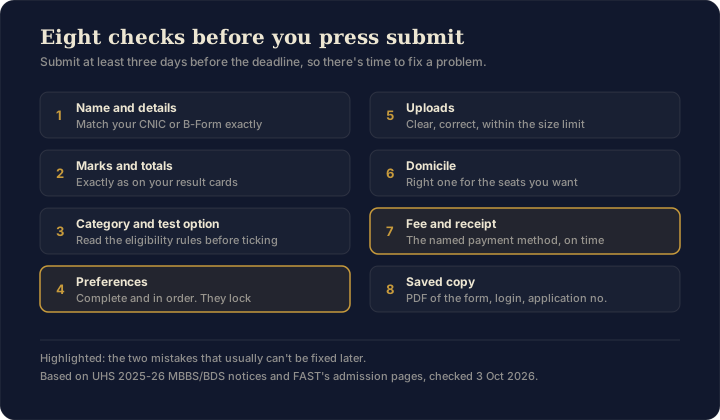
Your pre-submission checklist
Before you press submit, confirm that:
- Name, father's name and date of birth match your CNIC or B-Form and certificates
- Marks and totals match your result cards exactly
- The category, stream and test option are correct
- Preferences are complete and in the order you want
- Every upload is clear, correct and within the size limit
- The domicile is right for the seats you're applying to
- The fee is paid by the right method, and the receipt is uploaded
- You've saved a PDF of the final form, your login and your application number
Frequently Asked Questions
What happens if I enter wrong information on an admission form?
Universities check every document at admission. FAST says incorrect information lets it cancel the application or admission without any fee refund, and UHS cancels admissions with forged or false information. Enter every detail exactly as on your documents.
Can I change my preferences after submitting the form?
On UHS's MBBS and BDS portals you could edit the form until the deadline, but after that the number and order of preferences became final. Rank colleges by where you actually want to go, and include every college you'd be happy to join.
What size should uploaded documents be?
Follow each portal's limit. UHS asked for clear, legible files no bigger than 1 MB each, and a missing required document made the application invalid. Scan flat, in good light, and open each file after uploading to check it.
What if my name is spelt differently on my documents?
Your name, father's name and date of birth should match your CNIC or B-Form and board certificates exactly. A mismatch can cause questions at document checking or the test centre. If your documents disagree, start getting them corrected early, because it takes time.
When should I submit my admission form?
At least three days before the deadline. On the last day portals slow down, banks close early, and there's no time to fix a wrong document. Save a PDF of the final form, your login and your application number.
Next steps
- Public vs private admissions: how the rules differ between the two.
- Backup plan guide: build a list so one mistake can't cost you a year.
- Passed MDCAT? What decides your seat: how medical merit works.
The rules quoted above are from UHS's 2025-26 MBBS and BDS admission notices for Punjab, FAST's How to Apply and Eligibility Criteria pages, and PIEAS's 2026 admission schedule, all checked on 3 October 2026. Every university has its own form, so read its instructions before you start.